
If you play online poker seriously, you are not just choosing a room. You are also choosing the software you use to study, review, and understand your results.
Some tools collect hands. Some show you opponent tendencies. Some replay spots street by street. Some calculate equity. Some help you compare ranges. Some try to solve a spot close to game theory.
Used well, poker software saves time and shows you leaks you would never spot from memory alone. Used badly, it becomes clutter, confusion, or a subscription you barely open.
This guide walks you through the main types of poker software:
- poker trackers
- HUDs
- hand replayers
- equity calculators
- range tools
- poker solvers
- coaching and study tools
It also helps you choose the right setup for your game, your format, and your budget.
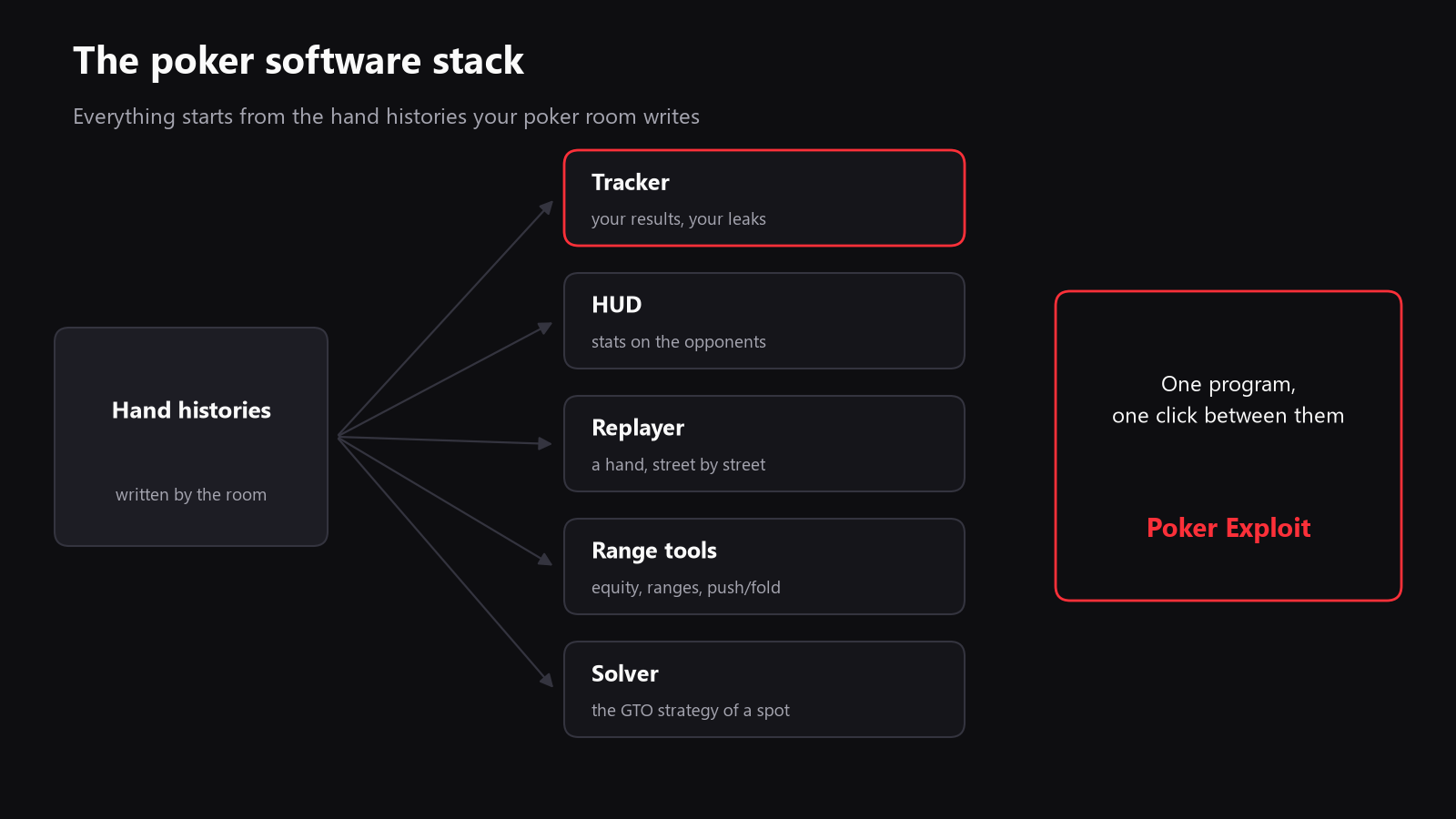
At a glance: what each poker tool is for
| Tool | What it does | Best for | Main limitation |
|---|---|---|---|
| Tracker | Stores and sorts hand histories, results, and stats | Understanding your results and leaks | Only as good as the hands it receives |
| HUD | Shows opponent stats at the table | Fast reads in supported rooms | Depends on the room’s rules |
| Replayer | Replays hands street by street | Reviewing decisions with context | Does not solve the spot for you |
| Equity calculator | Compares hand vs hand or range vs range | Quick math checks | Real poker is deeper than raw equity |
| Range tool | Builds and compares hand ranges | Preflop and postflop study | Needs practice to use correctly |
| Solver | Finds near optimal strategies | Learning sound strategy | Can be slow, abstract, and hard to apply |
| Coaching tool | Explains a spot or asks you questions | Turning data into lessons | Quality depends on the input and design |
1) Poker trackers: the foundation of serious review
A poker tracker is the base layer of most online poker study. It imports your hand histories, stores them in a database, and turns them into reports.
That means it can show you:
- total hands played
- win rate over time
- profit and loss by game, stake, position, or hour
- showdown and non-showdown results
- where your biggest leaks are
- which opponents you have played most often
A good tracker does more than display numbers. It helps you answer better questions.
For example:
- Are you actually winning, or is the sample too small?
- Do you lose more from the blinds than you think?
- Is one stake harder than the others?
- Do you bleed money in one situation, such as calling too wide against 3-bets?
- Is your result still inside normal variance?
If you play cash games or MTTs, this matters a lot. A tracker can tell you whether a downswing is still normal, or whether a pattern in your game is costing you real money.
What to look for in a tracker
A good tracker should:
- import hand histories reliably
- support your poker room
- let you filter by format, stake, position, stack depth, and date
- give you clear graphs and reports
- keep your notes and player tags organized
- stay fast even when your database grows
Common mistake
The biggest mistake is treating the tracker as a scoreboard only. The point is not just to know your winnings. The point is to understand why the line moved.
2) HUDs: fast reads at the table
A HUD, short for heads-up display, puts opponent statistics on top of the table while you play.
Typical stats include:
- VPIP, how often a player voluntarily puts money in the pot
- PFR, how often they raise preflop
- 3-bet frequency
- fold to 3-bet
- continuation bet frequency
- fold to continuation bet
A HUD is useful because it reduces guesswork. If a player is very loose, very tight, unusually aggressive, or very passive, you can see that quickly.
But a HUD is only a tool for reading observed behavior. It is not magic, and it is not a recommendation engine.
What a HUD is good for
- recognizing player types quickly
- spotting extreme tendencies
- confirming that a player is a regular, a recreational player, or a nit
- supporting exploitative decisions based on your own sample
What a HUD is not for
- making decisions for you
- replacing hand reading
- assuming a player will keep behaving exactly the same way
- drawing conclusions from tiny samples
Important note on room rules
Each poker room has its own rules about HUDs. Before you choose software, make sure it fits the rules of the sites where you play.
3) Hand replayers: where real learning starts
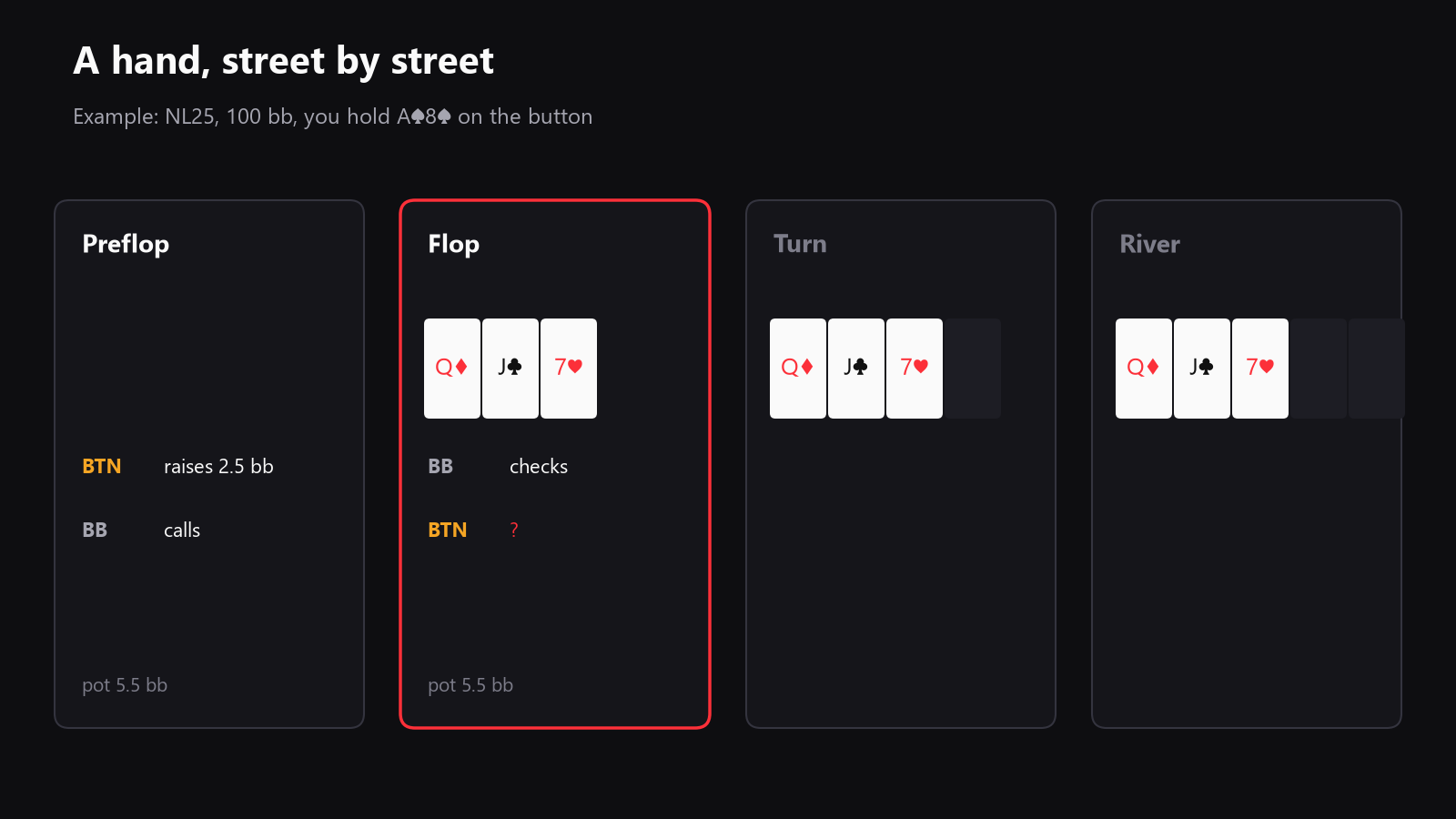
A hand replayer shows a hand street by street, so you can review every decision in order.
This sounds simple, but it is one of the most valuable study tools in poker.
Why? Because most mistakes are easier to understand when you see the whole hand:
- the stack sizes
- the preflop action
- the board texture
- the turn card that changed everything
- the sizing choices
- the river spot where the hand became difficult
A replayer helps you slow down and ask the right question at each step:
- Was the preflop range too loose?
- Was the flop c-bet too small?
- Did the turn card improve my range or my opponent’s?
- Was the river value bet thin, or was it a bluff catcher spot?
How to review hands properly
When you use a replayer, do not ask only “Was my final decision right?”
Ask:
- What was the pot size at each street?
- What ranges did both players have?
- Which hands did I expect my opponent to have?
- What changed from flop to turn to river?
- Was I thinking in ranges, or only in my own hand?
That habit is what turns hand review into skill building.
4) Equity calculators: the math behind the spot
An equity calculator tells you how often one hand or range wins against another over many runouts.
For example, you might compare:
- top pair versus a draw
- a value range versus a calling range
- one preflop range against another
This is useful, but equity alone does not tell the full story. Poker is not only about raw equity. It is also about position, fold equity, blockers, nut advantage, stack depth, and future betting streets.
Still, equity calculators are excellent for learning:
- when your hand is ahead
- when your draw has enough equity to continue
- why some bluffs work better than others
- how strong your value bets really are
If you are new to study tools, equity calculators are usually one of the easiest places to start.
5) Range tools: learning to think in ranges
A range tool helps you compare hand ranges instead of single hands.
This is a big step forward in poker study. Good players do not think only in isolated hands. They think in ranges:
- what range opens from early position
- what range defends the big blind
- what range continues versus a c-bet
- what range can raise this board
- what range arrives on the river after previous actions
Range tools are especially useful for:
- preflop charts
- flop and turn construction
- understanding which hands belong in value, bluff, call, or fold categories
- reviewing spots where you feel something is off but cannot explain why
If you want to improve fast, ranges are one of the highest-value concepts to learn.
6) Solvers: the reference point for good strategy
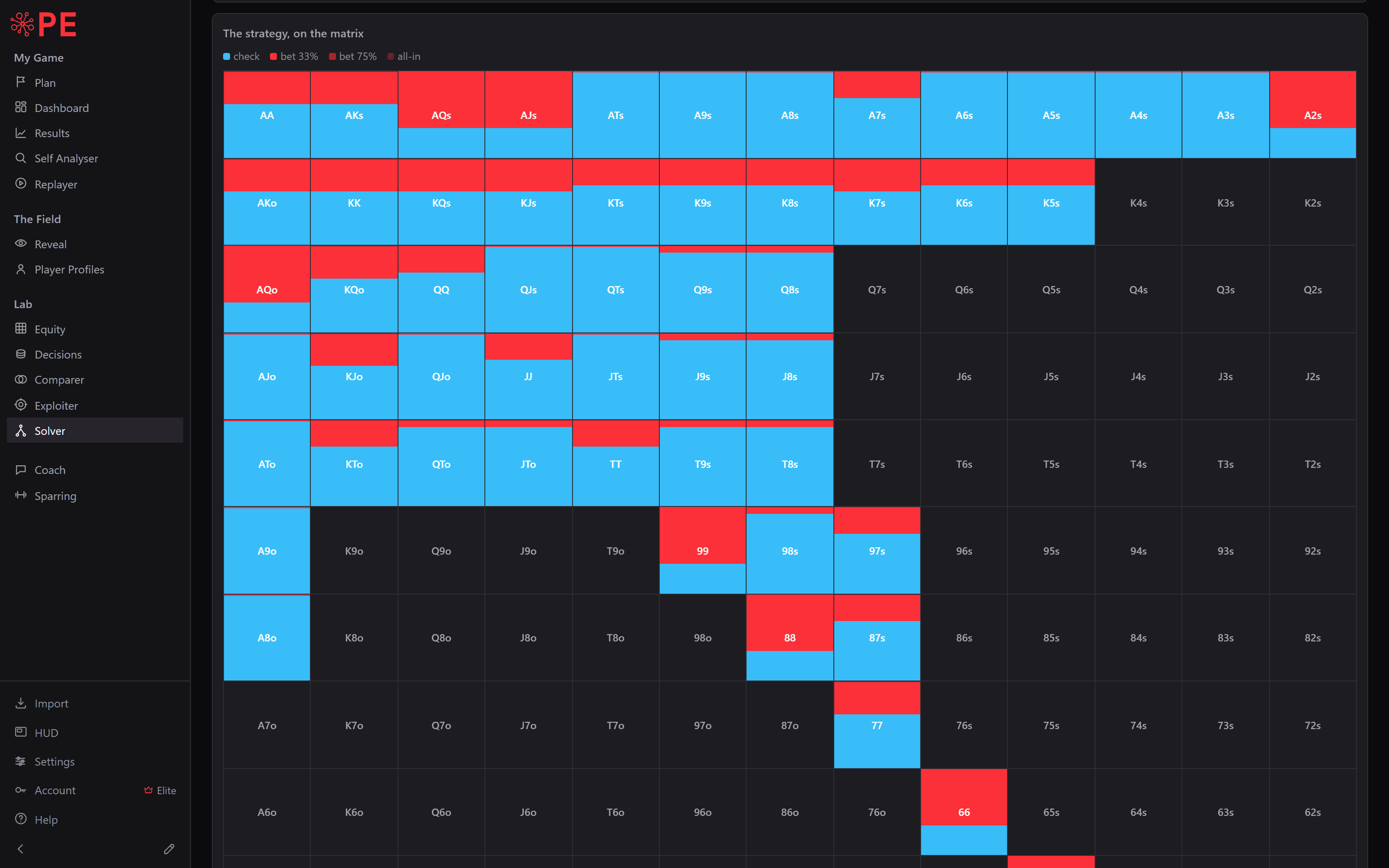
A poker solver computes a strategy for a spot using game theory. In simple terms, it shows what an equilibrium approach looks like when both players are playing well.
A solver is not there to tell you what the average player does. It is there to show you what the game itself supports.
That makes it useful for:
- understanding balanced strategies
- seeing which hands check, bet small, bet big, or go all in
- studying board textures
- checking whether your intuition is too value heavy or too bluff heavy
- learning why some hands mix between actions
What solvers are best for
- building a solid technical base
- checking your assumptions
- learning how boards interact with ranges
- preparing for tougher player pools
What solvers are bad at
- giving you a perfect answer in every real game
- replacing adaptation to weak opponents
- solving the exact dynamics of your pool if you never compare it to real hands
A solver is a teacher, not a shortcut. If you use it well, it can make you more precise. If you use it blindly, it can make you overly theoretical.
7) Study and coaching tools: turning data into decisions
The best poker software does not stop at reporting. It helps you decide what to study next.
That can mean:
- identifying the situation that costs you the most
- comparing your frequencies with the field
- asking a question about a real hand
- showing you why a line is losing money
- suggesting a study plan based on your own database
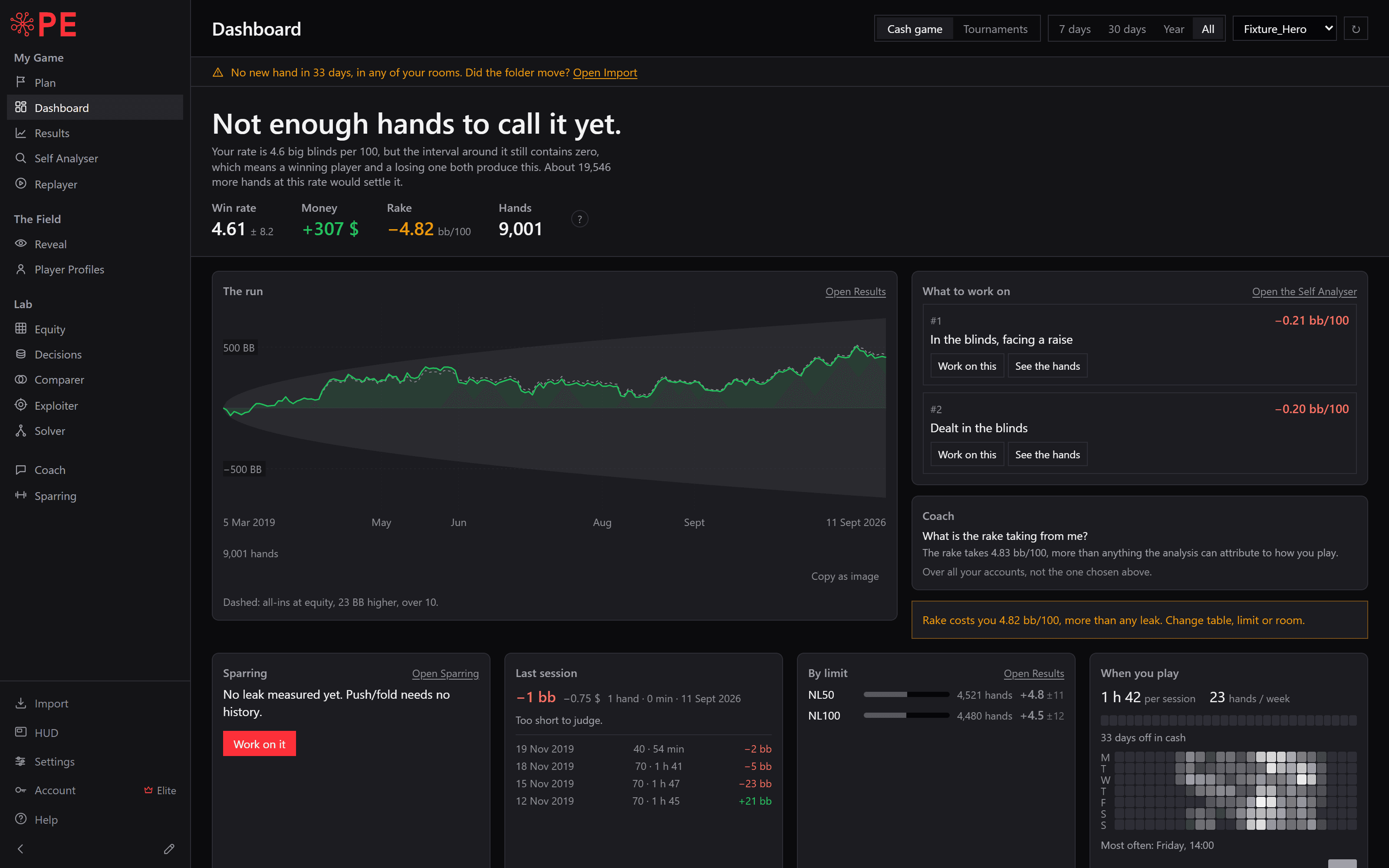
This is where modern all-in-one software becomes attractive.
Instead of exporting hands to one tool, opening another for ranges, and another for solver work, you can keep the entire workflow in one place. That saves time, and it makes study more likely to happen.
If you use a suite like that, look for one thing in particular: the ability to move from a hand, to the spot, to the analysis without friction.
8) How to choose poker software
If you are comparing poker software, do not start with the brand. Start with your needs.
Ask yourself these questions
1. What do you play?
- Cash games?
- MTTs?
- Spin and Go?
- Heads-up?
- Multi-table grind or low volume?
Different formats need different tools and different reports.
2. How much volume do you play?
If you play a lot, database speed matters. If you play only a little, simplicity may matter more than advanced filters.
3. What room rules apply?
Before buying a HUD or a study stack, check the rules of the room where you play.
4. Do you want separate tools or one system?
Some players prefer best-in-class tools from different vendors. Others prefer one program that keeps everything connected.
5. How much time will you really spend studying?
A complicated setup that you never open is worse than a simpler one you use every week.
A good poker software stack should be:
- reliable
- easy to import and filter
- fast enough for your database size
- clear enough to use regularly
- legal where you play
- worth the money for your stakes
9) The best software setup by player type
If you are a beginner
Start with:
- a tracker
- a replayer
- basic range charts
- simple equity tools
Do not rush into advanced solver work before you can explain basic preflop and flop decisions.
If you play micro stakes cash
You usually want:
- a tracker
- a HUD if the room allows it
- a replayer
- simple leak finding
- some solver study for common spots
At these stakes, the biggest gains often come from discipline, value betting well, and not making large preflop mistakes.
If you play MTTs
You need:
- a tracker that handles tournament data cleanly
- ICM-aware tools
- a replayer
- range work for push, call, and late-stage spots
- postflop study for stack depth and bubble pressure
If you are a serious grinder
You will probably want:
- deep database filters
- strong HUD reporting
- detailed leak analysis
- solver work
- a workflow that links review and study efficiently
10) Common mistakes players make with poker software
Buying too much too soon
You do not need every tool on day one. Start with the basics and build from there.
Never reviewing your database
A tracker is useless if you only look at the profit line.
Copying solver output without understanding it
A solver result is not a rule to memorize. It is a model to understand.
Ignoring your pool
What works in theory is not always what you should do against the field you actually face.
Collecting stats, but not using them
The point of software is not data hoarding. The point is better decisions.
11) A simple workflow that actually works
If you want a practical routine, use this:
- Play your session.
- Let the tracker import the hands.
- Review the biggest pots and the most confusing spots in the replayer.
- Use a range tool or equity calculator to understand the spot.
- Check solver output when the situation is strategic and common.
- Write down what you learned.
- Return to the database later and see whether the leak is shrinking.
That cycle is simple, but it works.
12) What good poker software should feel like
The best software does not feel impressive. It feels useful.
You should be able to:
- find a hand quickly
- understand the report without guessing
- move from a result to a spot to a lesson
- see whether a leak is real
- know what to work on next
If your current tools make study feel fragmented, that is usually a sign to simplify.
An integrated program can help here. When your tracker, HUD, replayer, range tools, solver, and coaching features live in one place, the distance between “I saw something strange” and “I understand it now” gets much shorter.
Final thought
Poker software is not about owning the most tools. It is about using the right ones in the right order.
Start with the basics:
- track your hands
- read your results
- review your biggest mistakes
- study ranges and equity
- use solver work as a reference, not as a crutch
If you get that part right, your software stops being a collection of apps and becomes a real learning system.
And if you prefer one environment where those steps connect naturally, that is the kind of workflow we built Poker Exploit to support.
Do it on your own hands.